

Customer shipment lookup page
Switch on your own page where customers find their goods by a paperwork number and the last 4 digits of their phone.
The customer shipment lookup page is your own web page where customers find their goods without calling you. It is off until you switch it on.
Switch it on
- Open Settings and stay on General.
- Find Customer shipment lookup page and switch it on.
- Your page address appears, with Copy link, Share on WhatsApp and Open the page.
- Send the address to customers, or add it to your WhatsApp replies and email signature.
What the customer does
- Opens your page, or scans the QR code on the goods received note (the shipment number is then already filled in).
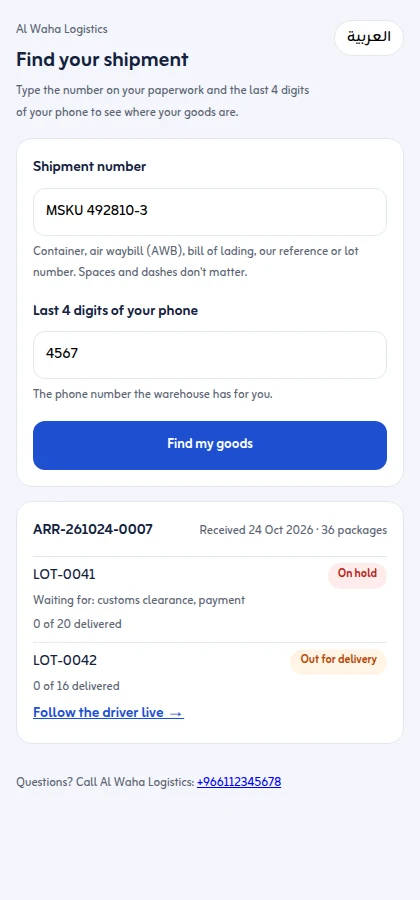
- Types the Shipment number: the container, air waybill (AWB), bill of lading, your arrival reference, the supplier reference or a lot number. Spaces and dashes do not matter.
- Types the Last 4 digits of your phone: the phone number you have for that customer.
- Presses Find my goods.
What the customer sees
Shipments received in the last 12 months that match, each lot with its status: In the warehouse, On hold with Waiting for customs clearance, documents, payment, delivery details or the warehouse, Cleared, ready to deliver, Out for delivery with Follow the driver live, Delivered, Needs attention or Returned. Each lot shows delivered packages of the total, and the page shows your business's phone.
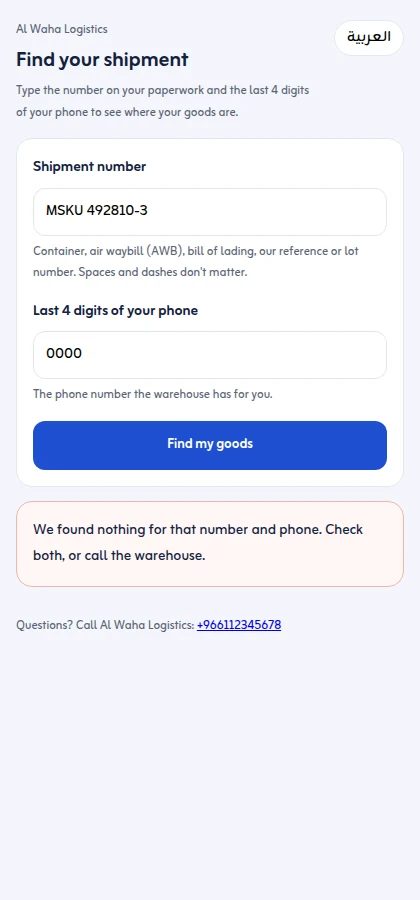
Your office's own notes on a hold are never shown. A wrong number or wrong phone digits show only "We found nothing", with no details.
Limits and changing the address
- Each page allows 20 lookups per address and 300 in total in 10 minutes; after that the customer is asked to wait a few minutes.
- Make a new address replaces the address: the old one stops working at once. Send customers the new one.
- Switching the setting off stops the page.
Next: customer map pins. More on the shipment tracking page and goods received notes.
