

The daily problems of an online store that delivers itself
A growing online store soon outgrows a notebook. Stock arrives from suppliers in boxes that look alike. Orders pile up, someone decides what goes out today, drivers are sent with a list, and cash on delivery comes back in an envelope. When a customer writes that the order did not arrive, the store has to find out what happened.
What this page does and does not promise
Tafsee Logistics is a warehouse-to-door system. Store owners can record the goods for their orders in it and deliver them with its trips, driver app, proof of delivery and cash handling. There is no store connection today. It does not import orders from Salla, Zid, Shopify or marketplaces, and it does not push statuses back to your store. You enter each delivery in Tafsee Logistics yourself, and share the tracking link with the customer on your own channels.
How the workflow in Tafsee Logistics handles it
1. Receive stock from suppliers
New Arrival records the supplier as the sender, the number of packages and the warehouse. The app creates a lot number and a barcode for each package. Print the labels and the stock can be found by scanning.
2. Know what you have and where
Set up zones and racks, and move lots by scanning the rack code. Count a rack by scanning its packages. See zones and racks and lots and packages.
3. Enter the customer's delivery
Each customer has a Saudi phone number, email and several delivery addresses with national address fields and an optional map pin. A customer can pin the exact door through a one-time link. See customer map pins. A pin cuts down on calls and failed deliveries.
4. Send orders out in trips
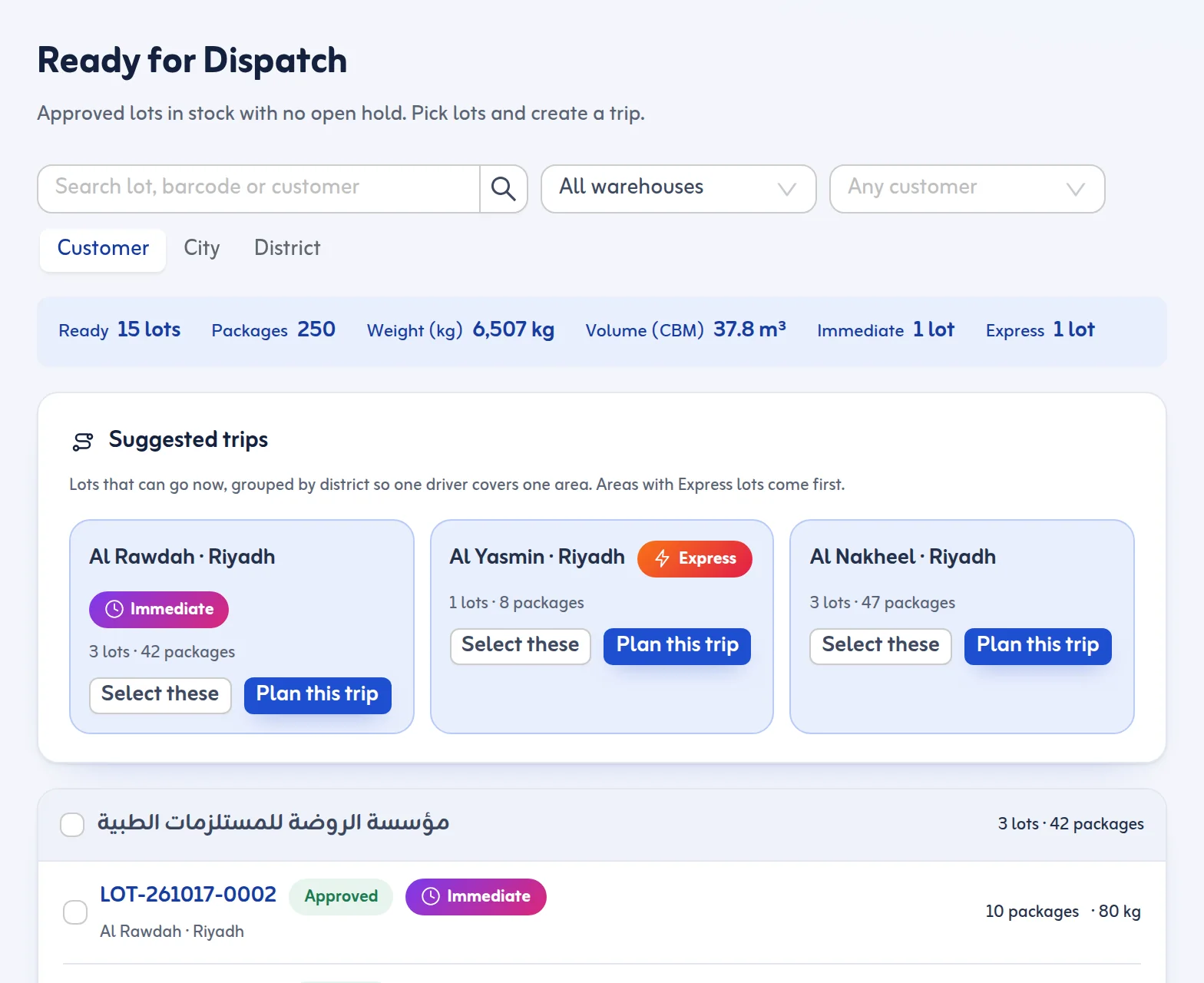
Approved lots appear in Ready for Dispatch, grouped by district, with suggested trips. A delivery trip has a driver, a vehicle and stops. Each stop can carry the cash to collect. Express and urgent areas go first.
5. Proof and a tracking link for the customer
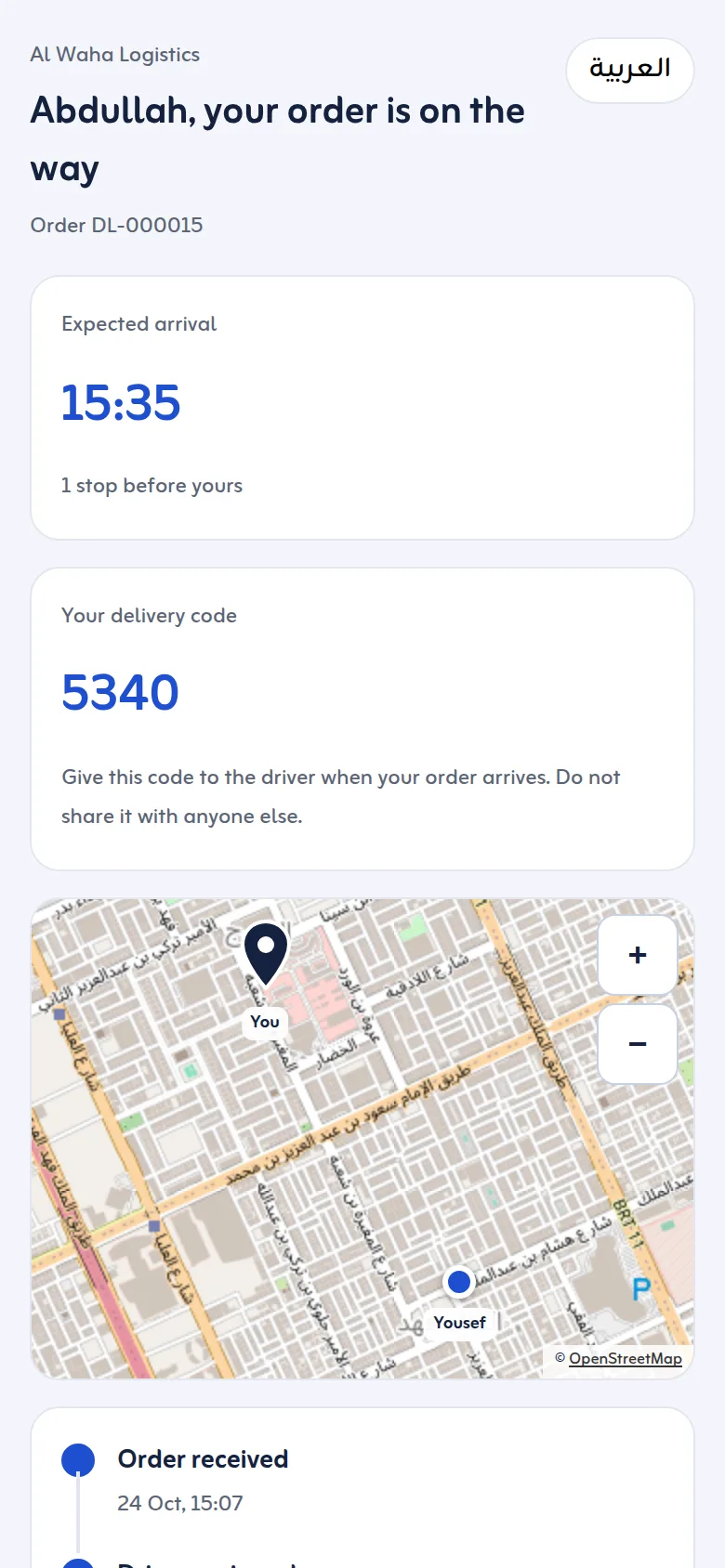
The driver finishes each stop with the customer's 4-digit code or signature. The customer sees the code on their tracking page. While the order is on the way the page shows the expected arrival time, how many stops come before theirs and, when the driver's phone has shared its location in the last 30 minutes, the driver as a dot on a map. 30 days after delivery the page stops showing the photo, signature and driver. Customer emails are optional and sent by Tafsee; there is no SMS or WhatsApp sending, so share the link yourself. See delivery tracking.
6. Cash on delivery and returns
Drivers record the cash collected; a different amount needs a note. After the trip the cash handover tab compares expected and counted cash. Failed deliveries stay in Returns & Settlement until you retry, return to stock or return to the sender. Returned goods are inspected as good or damaged before they go out again.
Who this suits
It suits stores that hold goods in their own warehouse and deliver locally in Saudi Arabia. If your orders are shipped by a courier company, Tafsee Logistics is not connected to those carriers.
See cash on delivery in Saudi Arabia, how to reduce failed deliveries and the pricing page for the plans and the 14-day free trial.
E-commerce fulfillment software for Saudi Arabia, without a store connection
As e-commerce fulfillment software in Saudi Arabia it covers storing and delivering your orders' goods. For Salla delivery management or Zid delivery management, you record the orders' goods in Tafsee Logistics yourself today: there is no connection to Salla or Zid that imports orders.
Order fulfillment software for your own warehouse
Ecommerce fulfillment in Saudi Arabia usually means four steps: receive stock, store it, pick and pack each order, and deliver it. As order fulfillment software Tafsee Logistics covers receiving, rack locations, picking lots into Ready for Dispatch, the load scan and delivery with proof. It is fulfillment software for a store that runs its own warehouse or a small fulfillment center in Saudi Arabia; it does not pick item by item from a product catalogue.
