

Warehouse Storekeeper: A Daily and Weekly Checklist
A practical daily and weekly checklist for a warehouse storekeeper, from receiving and bin locations to counts and holds, and how Tafsee Logistics supports each item.
Tafsee Team · · 4 min read
A warehouse storekeeper holds an unusual kind of responsibility. Nobody notices when the stock is right; everybody notices when a box cannot be found. The job is mostly habit: the same checks, in the same order, every day. This article gives a daily and weekly checklist you can print, adapt and hand to a new storekeeper, and shows how Tafsee Logistics supports each item.
What a warehouse storekeeper is responsible for
In a small warehouse the storekeeper may be the warehouse manager too. In a larger one the storekeeper owns the physical side: receiving, putting away, keeping the layout tidy, issuing goods against a release, and counting. Whatever the title, the core promise is the same: what the system says is on the shelf is on the shelf, and every movement has a name and a time against it.
The daily checklist
Start of the day
- Open the dashboard. Check arrivals expected today, open holds, lots ready for dispatch and anything flagged as needing attention.
- Walk the receiving area. Anything left from yesterday must be recorded, labelled and put away, or have a reason written next to it.
- Check the dispatch list. Know which lots are going out today, which are still on hold, and which trips are loading.
During the day
- Receive against paperwork. Count packages, look for damage, take photos, record the arrival and print labels. A good habit is to print a goods received note for the delivering driver to sign. See how to write a goods receipt note.
- Put away to a bin location. Every lot gets a rack code, so nobody has to remember where it went.
- Release only what is released. Check approvals and holds before any lot is issued. Issuing goods against a proper out-document, what many Saudi warehouses call سند صرف مخزني, means the movement has a record.
- Load by scan. Scan each package onto the vehicle so what leaves is what was planned.
End of the day
- Check returns. Goods that came back go through inspection, good or damaged, before they are stocked again.
- Close open loops. Every hold has an owner and a next step; every failed delivery has a decision.
- Tidy and lock. Aisles clear, labels readable, damaged goods separated.
The weekly checklist
- Count a few racks. A short count of a handful of racks each week finds errors while they are small. See the stock count guide.
- Review old stock. Which lots have sat longest? Contact the owners.
- Review the layout. Fast-moving goods near the door, heavy goods low, no rack over capacity. This is warehouse slotting: choosing where each kind of goods lives so picking and putting away stay short.
- Review holds. Anything on hold for a long time needs a call, not another week.
- Read the numbers. A few warehouse KPIs are enough: arrivals, stock by age, holds and how long they last, dispatch and delivery results.
How Tafsee Logistics supports each item
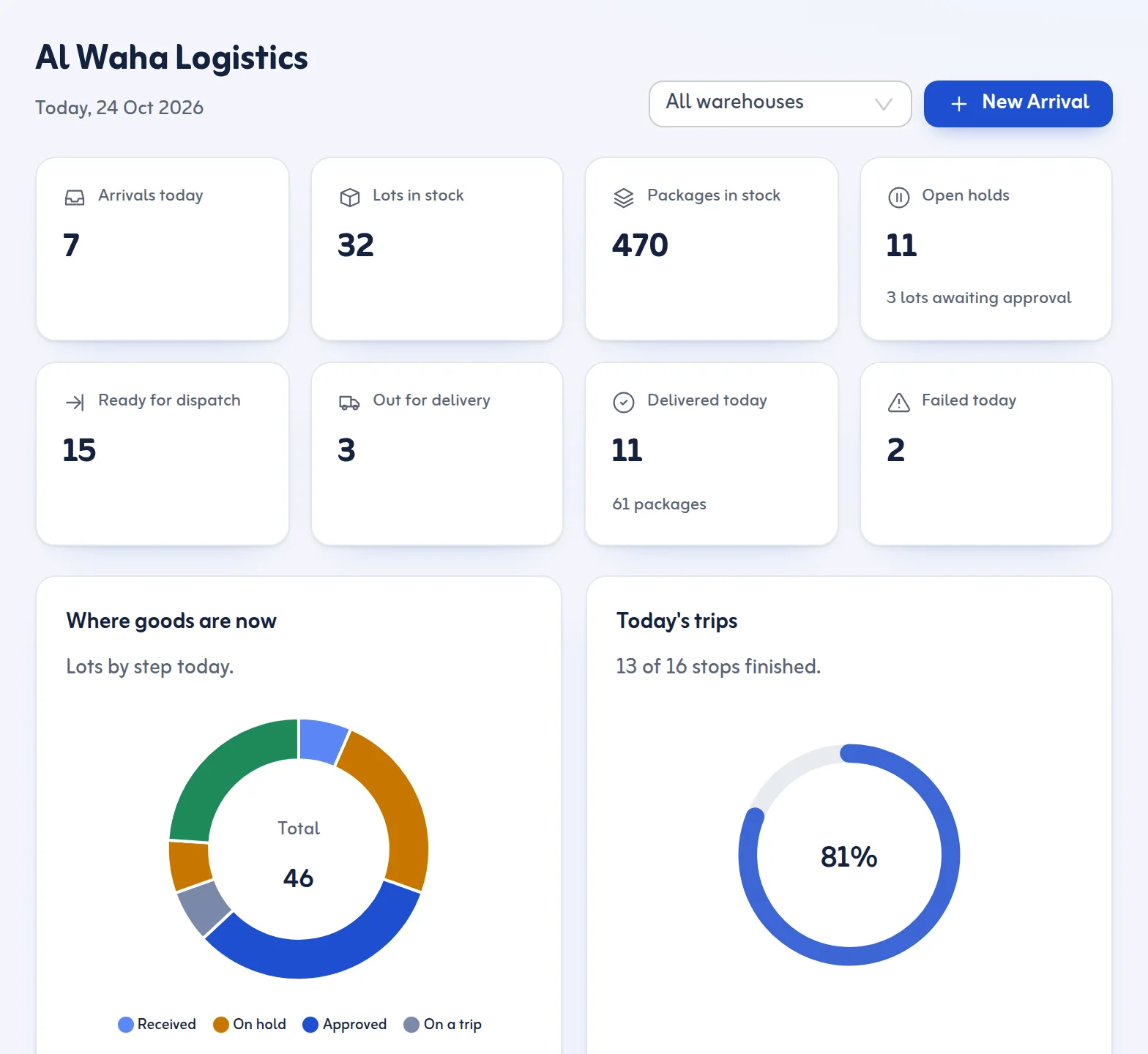
The dashboard shows tiles for arrivals today, lots and packages in stock, open holds, ready for dispatch, out for delivery, delivered today and failed today, and a Needs attention list for old holds, approved lots that have not been dispatched and failed deliveries waiting for another attempt. You choose the number of days in Settings. That is a ready-made warehouse dashboard for the first ten minutes of the day.
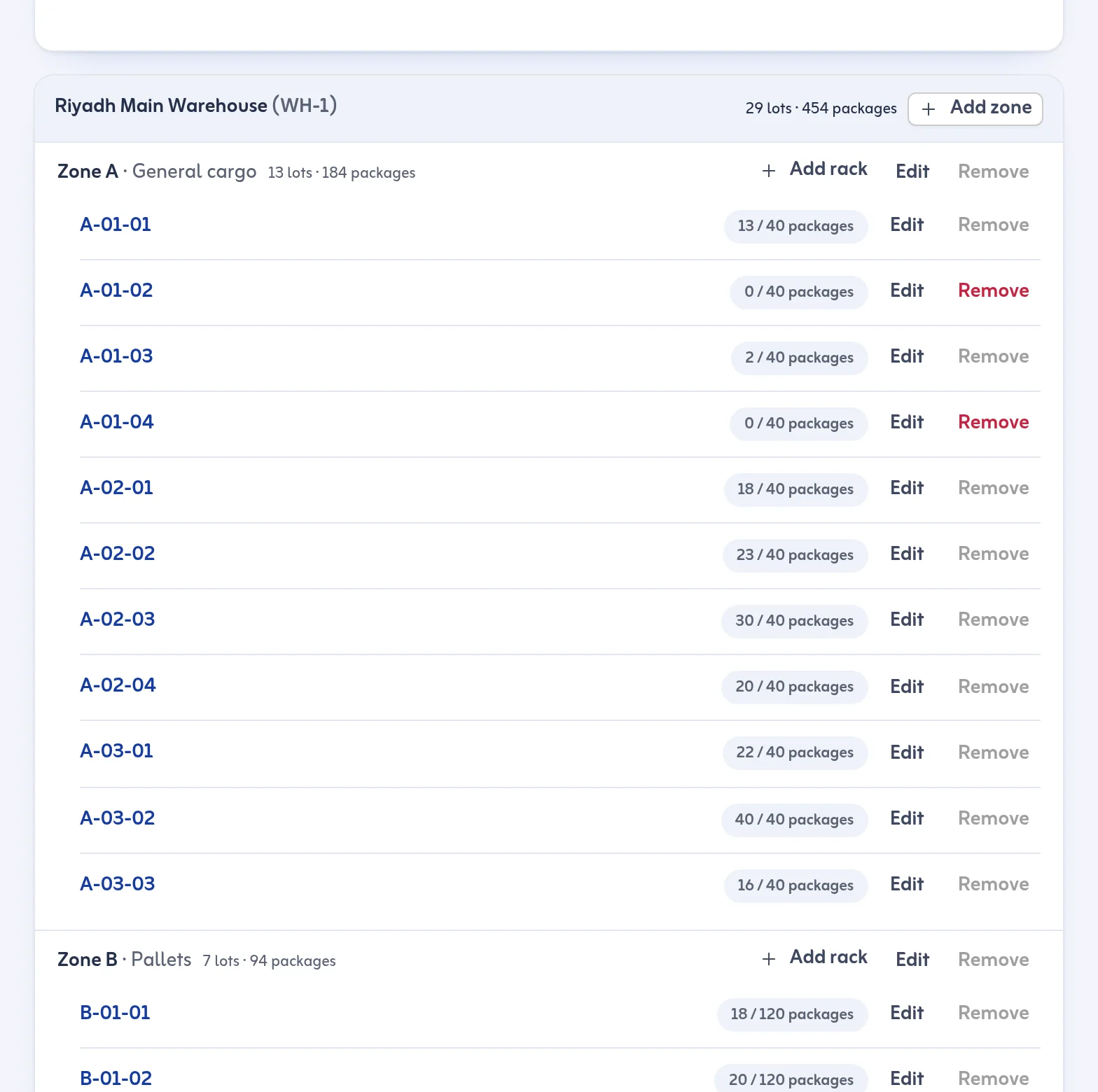
For layout, Zones & Racks lets you set up warehouses, zones and racks with codes like A-01-02, unique per warehouse. A rack can have a capacity in packages; going past it warns you and never blocks you. Each rack shows what it holds: lots, packages and age. A zone or rack that holds goods cannot be deleted. Moving a lot means scanning the rack code or picking it, and the move is recorded.
Each package carries its own barcode, a big scan box opens any lot at once, and a lot's page shows its rack, holds and timeline. Stock count mode lets you scan the packages on a rack and see what is missing or unexpected before you save. Reports cover arrivals, stock by warehouse, rack, customer and age, holds, dispatch and delivery, with a date range and a warehouse filter. Every action is recorded with who and when, which is what a storekeeper needs when a question comes later.
What the software does not do
Tafsee Logistics does not decide your slotting for you and it does not set your KPIs. The bin location is an address you choose and record, and the reports show the numbers the system holds. The discipline, the walk through the warehouse and the decision to move a pallet are still the storekeeper's.
Where to go next
To set up racks, read warehouses, zones and racks and the zones and racks feature. For the reports, see reports. Start at the Tafsee Logistics page and the 14-day trial.
Questions
Frequently asked questions
Arrivals and anything left in the receiving area, open holds, the dispatch list, returns and open loops such as failed deliveries. The checklist above puts them in order.
You can set a capacity in packages. Going past it shows a warning but never blocks the move.
No. You choose and record the rack for each lot. The software then shows what each rack holds and how old it is, so you can review your layout.
Yes. The dashboard has a Needs attention list for old holds, approved lots not yet dispatched and failed deliveries awaiting a re-attempt; you set the number of days in Settings.
More articles
Receive your first shipment today
Try everything in Growth free for 14 days, then choose a plan. No card is needed.
- Arabic and English
- Built for Saudi Arabia, in SAR
- Nothing to install

Warehouse & delivery
Tafsee Logistics
Receive goods with a barcode on every package, hold them until they are cleared, then plan delivery trips with proof at every door.