

Shipment Tracking for Businesses That Deliver Their Own Goods
How a business that delivers its own goods can give customers a tracking page, what that page should show, and what it cannot do for parcels sent with courier companies.
Tafsee Team · · 6 min read
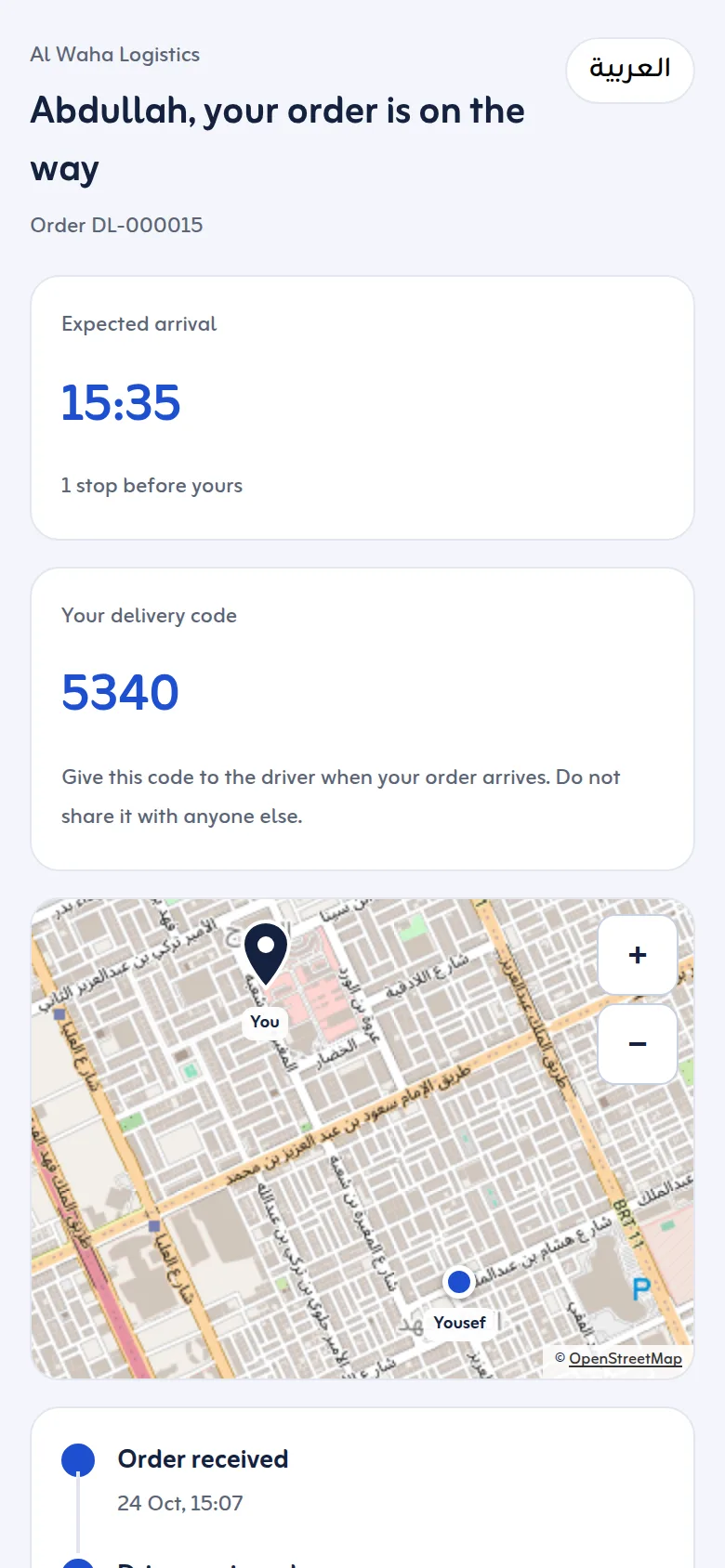
Ask a customer what annoys them most about an order and the answer is rarely the price. It is the silence: not knowing whether the goods have left the warehouse, whether the driver is nearby, or whether anyone will be home at the right time. Shipment tracking for businesses is the answer to that silence, and it matters most for companies that deliver their own goods with their own drivers.
First, an honest note on what this article covers
There are two very different things people mean by tracking. The first is looking up a parcel that was sent with a national courier or a postal service. For that, you use the courier's own tracking page, because only the courier holds that information. If you want to track a parcel sent with a courier company, use that courier's own tracking.
The second is the tracking a business offers for the goods it receives into its own warehouse and delivers itself. That is what this guide is about, and it is what Tafsee Logistics supports. It is not a lookup site for parcels sent with national couriers or postal services, and it does not connect to courier companies.
Why a business that delivers its own goods needs tracking
When you deliver with your own drivers, every customer call lands on your phone: where is my order, when will it arrive, why did the driver not call? Each call takes a minute or two from someone in the office. Multiply that by the number of deliveries on a busy day and tracking stops being a nice extra. It becomes the cheapest way to free your team from repetitive questions.
Tracking also changes how customers behave. A customer who can see that the order is on the way is more likely to be at the door. That alone reduces failed deliveries, which cost a driver's time and a second trip. For more on that, read how to reduce failed deliveries.
What a good customer delivery tracking link should show
A customer opens the link on a phone, usually while doing something else, so the page has to answer the obvious questions in seconds. A useful track my delivery page shows:
- The current status, in plain words: scheduled, out for delivery, delivered, partly delivered, failed or returned.
- The expected arrival, so the customer can plan the day.
- How many stops come before theirs, which turns a vague wait into something concrete.
- The delivery code, the short code the customer gives the driver at the door as part of the proof.
- The driver on the map, but only while it is real. A pin that sits there for hours after the phone stopped reporting is worse than no pin.
- Proof after delivery, so the customer and the sender can both see that the handover happened and how.
- A limited life. A tracking link holds a customer's address and name, so it should not stay open forever.
How Tafsee Logistics does it
The customer tracking page in Tafsee Logistics is a public link, opened in the phone browser with no login. It shows the status, the expected arrival, how many stops come before the customer's, and the delivery code. When the driver's phone has shared its location recently, the driver appears on the map; if it has not, the page does not pretend otherwise. After delivery the page shows the proof, and the link closes 30 days after delivery.
Your office sees the same deliveries in one list, with status, driver, time and the proof that was used. You copy the link or share it with the phone's own share button, so it goes out through whatever messaging app you already use. There is no SMS or WhatsApp sending built into the product, and customers can also receive optional emails when the trip starts and when the delivery is completed or fails.
The sender link
Customers are not the only people who ask about goods. Senders, suppliers and agents want to know where their consignment went after it reached your warehouse. A separate sender tracking link lets them follow their own goods without calling you. See delivery tracking for how the office and customer views fit together.
Live delivery tracking: what it can and cannot promise
Live delivery tracking sounds simple, but it depends on the driver's phone: it must be on, have signal and have location sharing allowed. A page that claims precision it does not have damages trust. That is why showing the driver only when the location is recent is the honest design, and why the status and the stops-before-yours count matter even more than the map. They stay accurate when a phone goes offline in a basement car park.
Tracking is only as good as the proof behind it
A status that says delivered means little if nobody can show how it was confirmed. Pair tracking with proof of delivery: a delivery code the customer reads out, or a signature on the driver's phone, plus an optional photo. When a customer later says they never received the goods, the record answers the question. We explain this in what is proof of delivery and on the proof of delivery page.
Checklist: before you share tracking links
- Record every delivery with a correct phone number and address; a link sent to the wrong number is a privacy problem, not a feature.
- Ask customers to pin their exact door if you can, so the driver does not need to call.
- Decide which proof you require: code, signature, photo or a combination.
- Choose the language of customer emails, Arabic or English.
- Tell drivers to keep their phone charged and location sharing on during the trip.
- Test the link yourself on a phone before sending it to a customer.
- Agree internally who answers when a customer says the page looks wrong.
Choosing shipment tracking software
If you are comparing shipment tracking software, ask whether it tracks the shipments you actually handle. Some tools exist to follow parcels across many courier companies. Others, like Tafsee Logistics, follow your own warehouse stock and your own trips. Choose by your real workflow. Then ask the practical questions: does the link work on a phone without an app, does it support Arabic, can you control what the customer sees, and does it close on its own after a while?
Where Tafsee Logistics fits
Tafsee Logistics is warehouse-to-door software for Saudi businesses that receive goods and deliver them locally. Tracking is one part of a chain that starts at the warehouse door and ends with proof of delivery. It does not replace courier tracking, accounting or customs systems. If that matches how you work, read about delivery trips, look at the tracking help article, or visit the Tafsee Logistics page and the plans and 14-day trial.
Questions
Frequently asked questions
No. Tafsee Logistics tracks the shipments a business receives and delivers itself. For a parcel sent with a courier company or a postal service, use that company's own tracking.
The status, the expected arrival, how many stops come before theirs and the delivery code. The driver appears on the map only when the phone shared its location recently, and the proof is shown after delivery.
30 days after delivery the page stops showing the photo, signature and driver.
No. You copy the link or share it with your phone's own share button. Optional customer emails are sent by Tafsee when the trip starts (with the delivery code) and when the delivery is made or fails.
More articles
Receive your first shipment today
Try everything in Growth free for 14 days, then choose a plan. No card is needed.
- Arabic and English
- Built for Saudi Arabia, in SAR
- Nothing to install
Warehouse & delivery
Tafsee Logistics
Receive goods with a barcode on every package, hold them until they are cleared, then plan delivery trips with proof at every door.